How to set it
With SteamVR open. No headset needs to be connected.
-
Open the SteamVR menu. It is the three-line button at the top left of
the small SteamVR window.
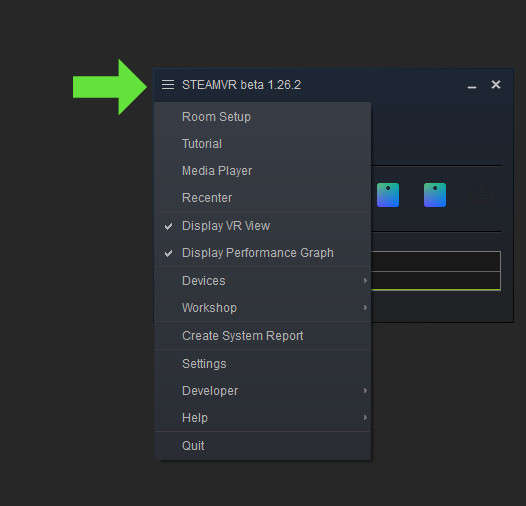
-
Go to Settings.
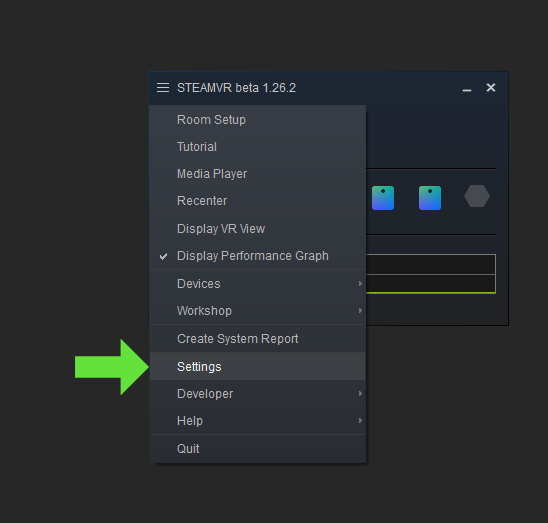
-
Pick OpenXR in the list on the left and press
the big SET STEAMVR AS OPENXR RUNTIME button. If the button is
greyed out or says it is already current, it was fine already.
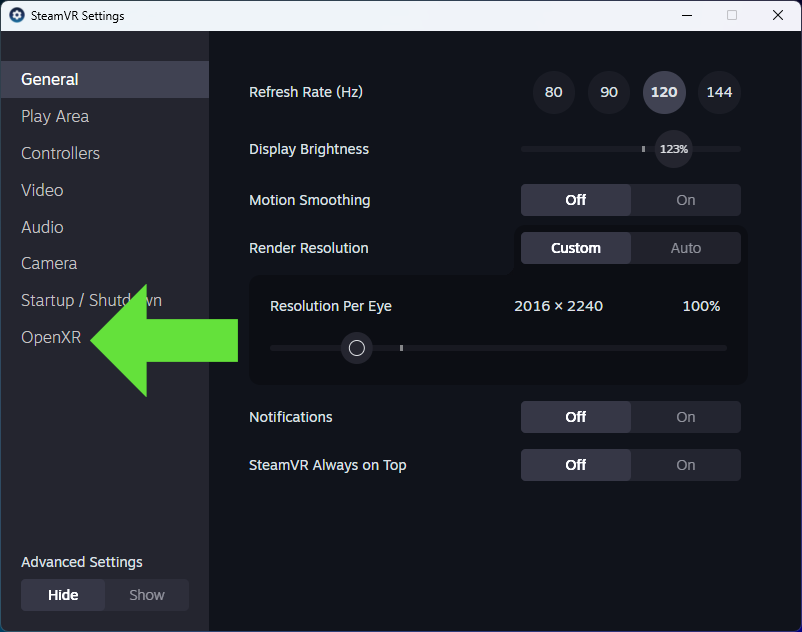
- Close SteamVR and open it again, and only then launch WRC in VR mode from Steam.
How to know it stuck: that same tab should read Current OpenXR Runtime: SteamVR. And in the TrueTriple app, under Install, the "OpenXR runtime" card turns green. If you cannot see an OpenXR tab, set Advanced Settings to Show at the bottom left: it shows up there, or under Developer.
Still not going triple? Back to the quick checks in Anti-bugs: the others are having the three monitors joined (Surround or Eyefinity), restarting SteamVR after saving, and launching WRC in VR mode rather than the normal one.
Screenshots are from LIV's guide, which needs the same setting. They show an earlier SteamVR version; the path is the same in the current one.