The app from the inside
You set it up once and after that it is open it and press Play.
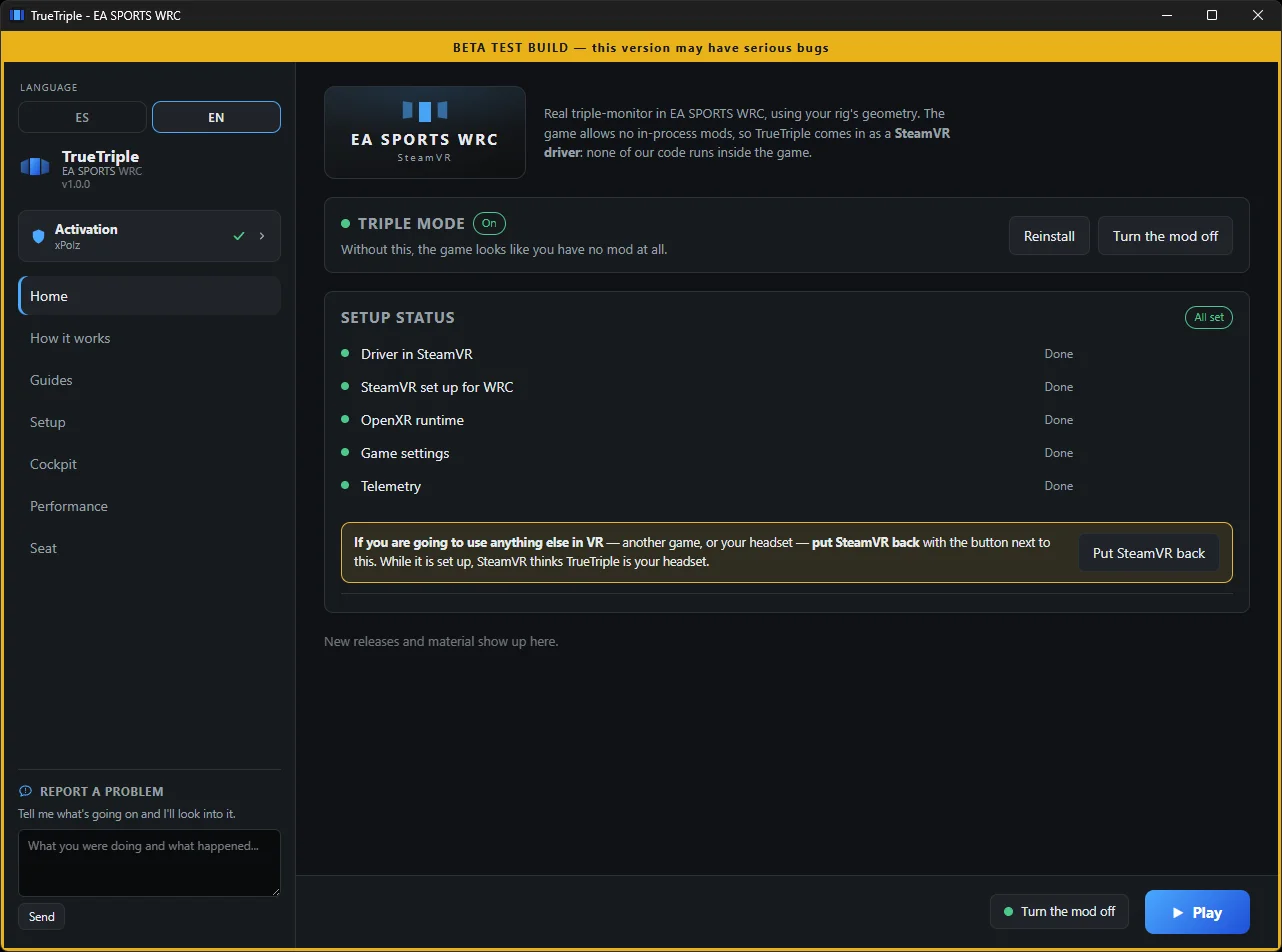
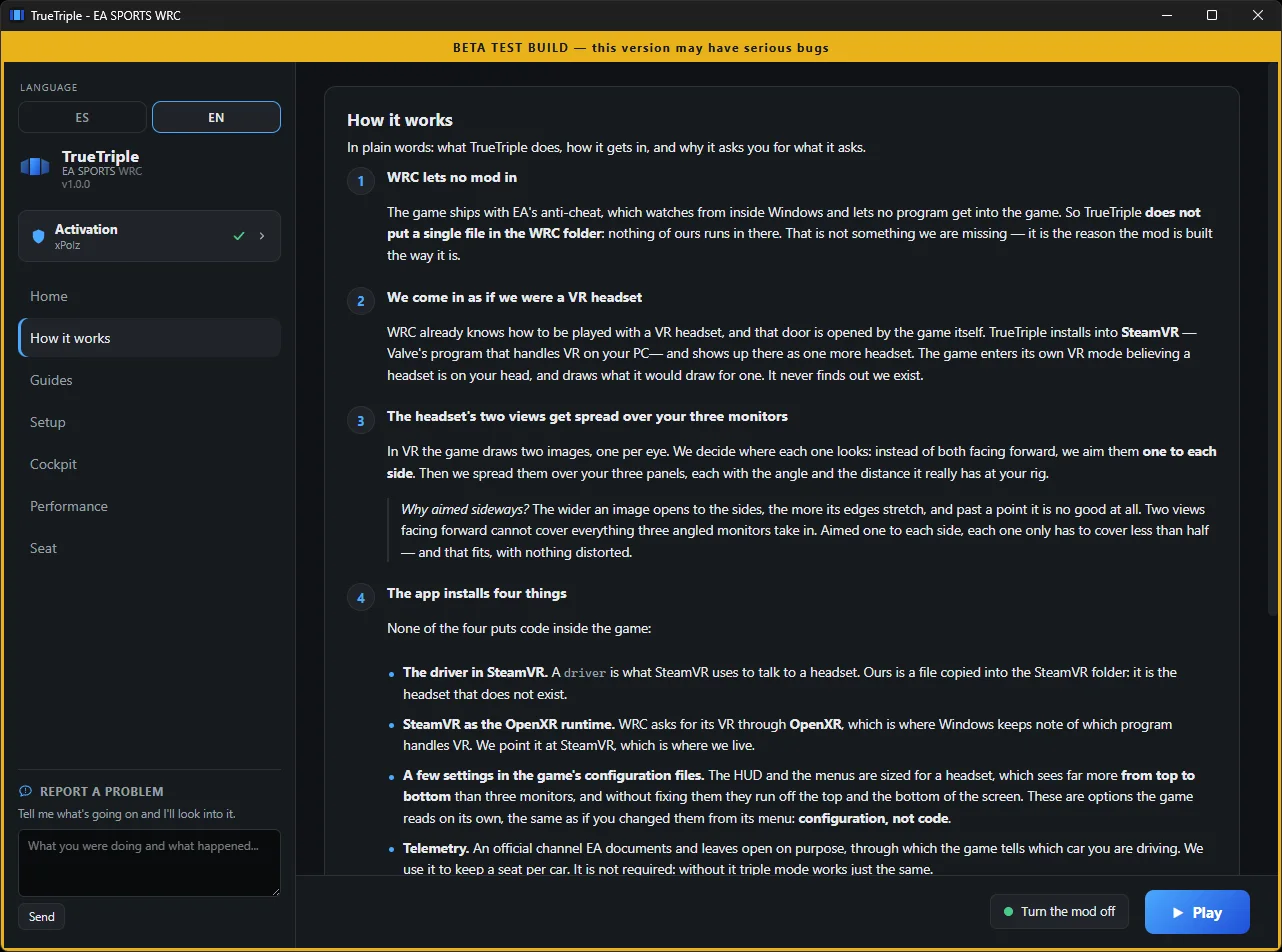
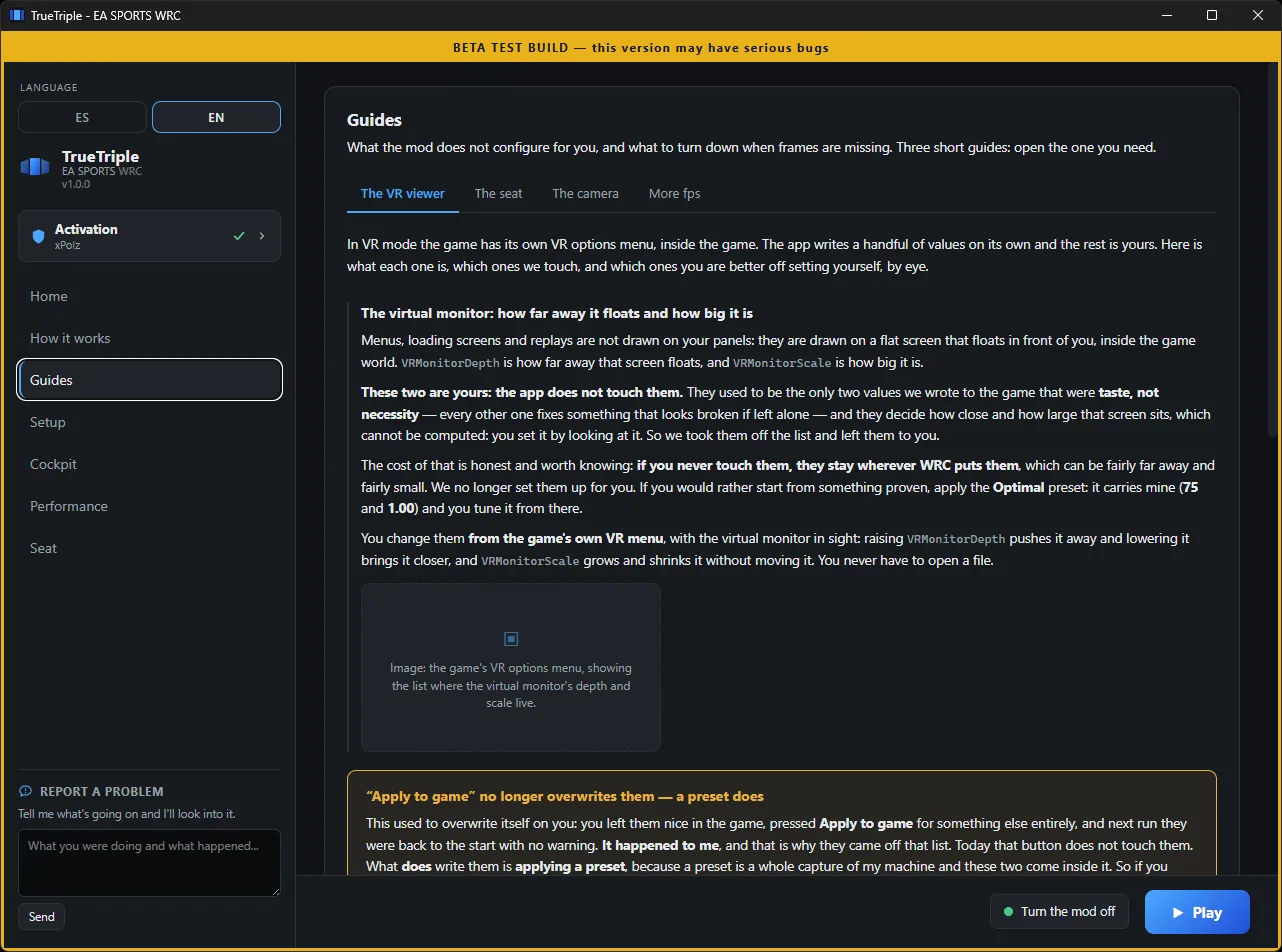
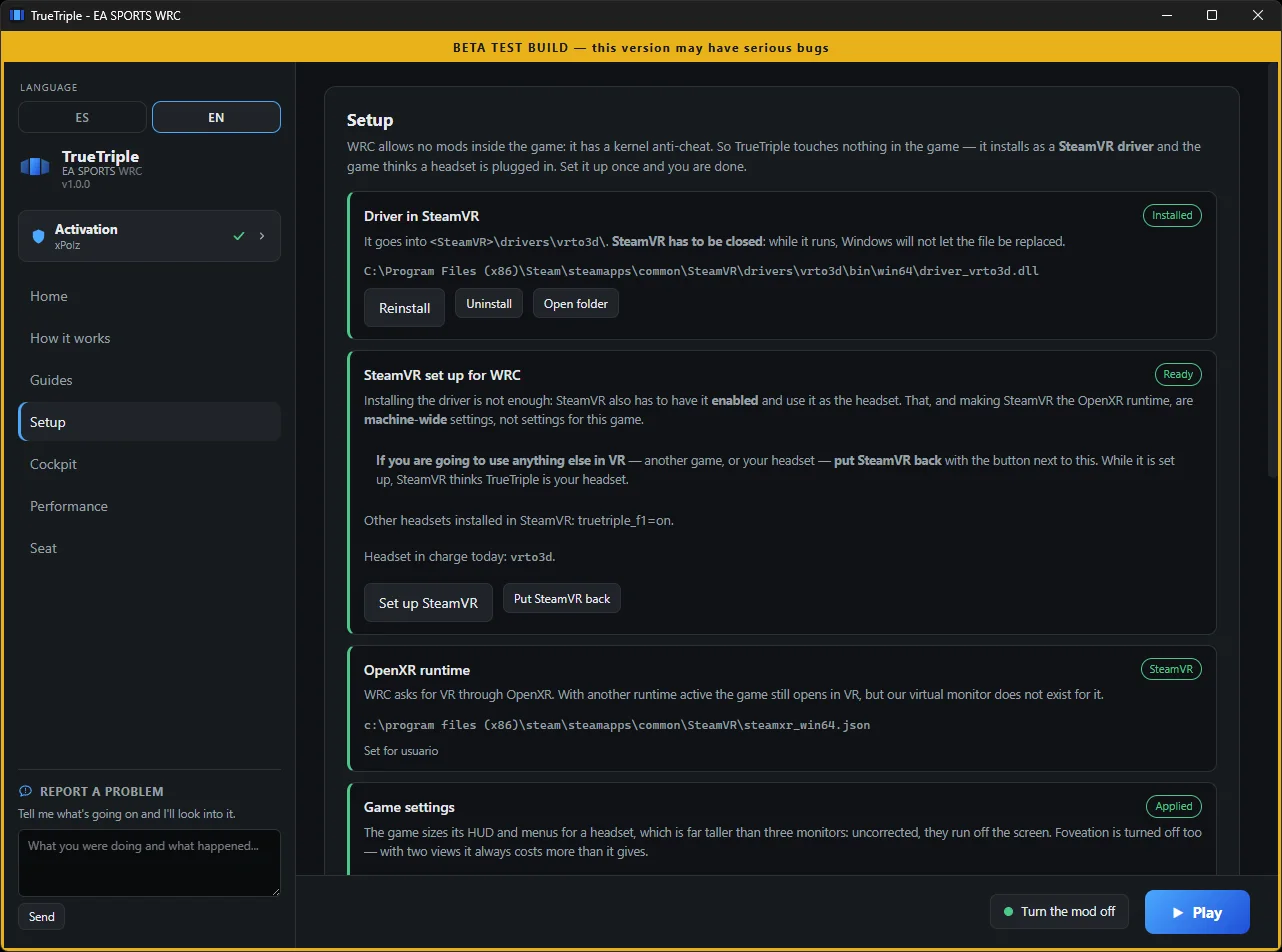
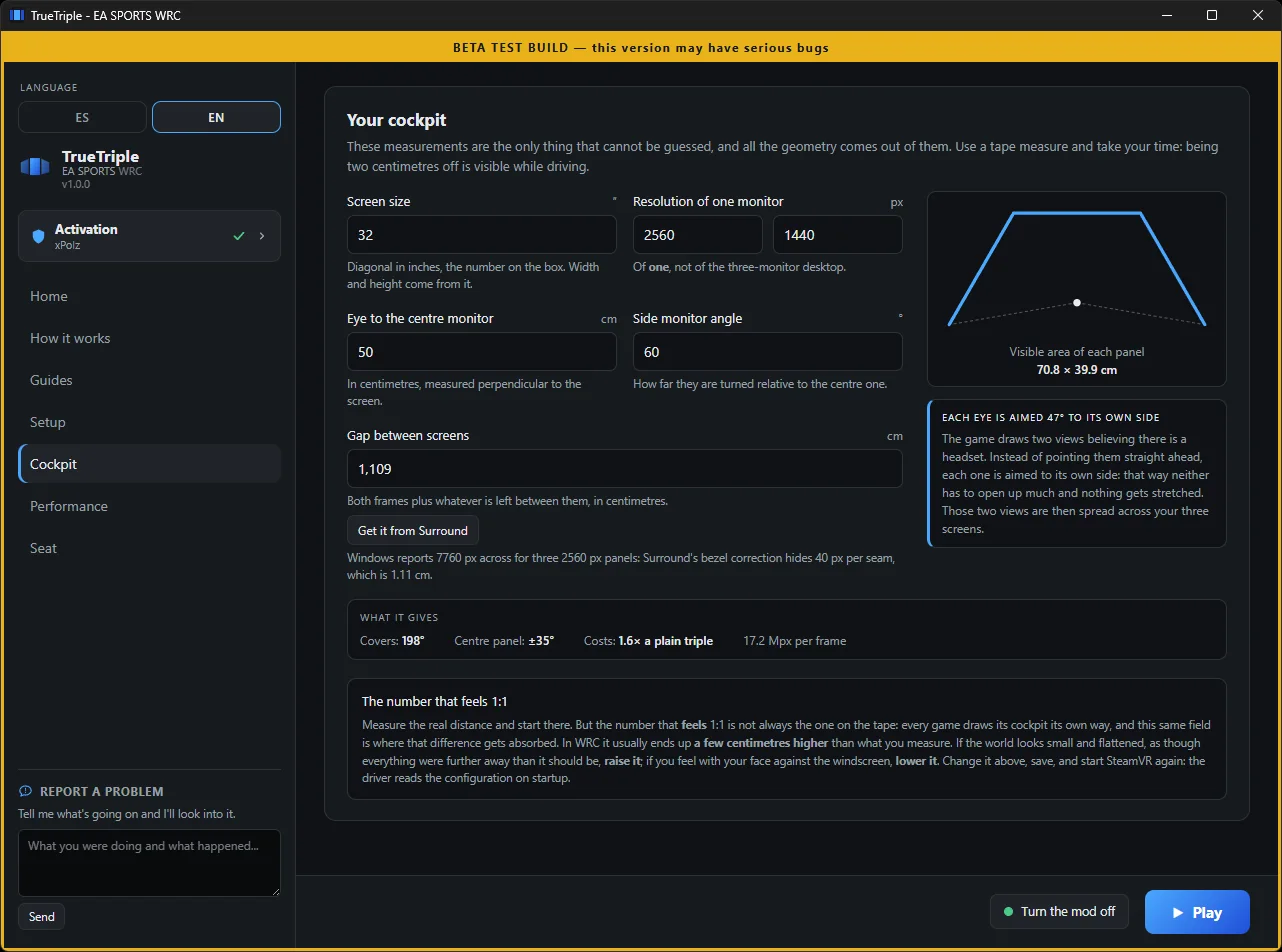
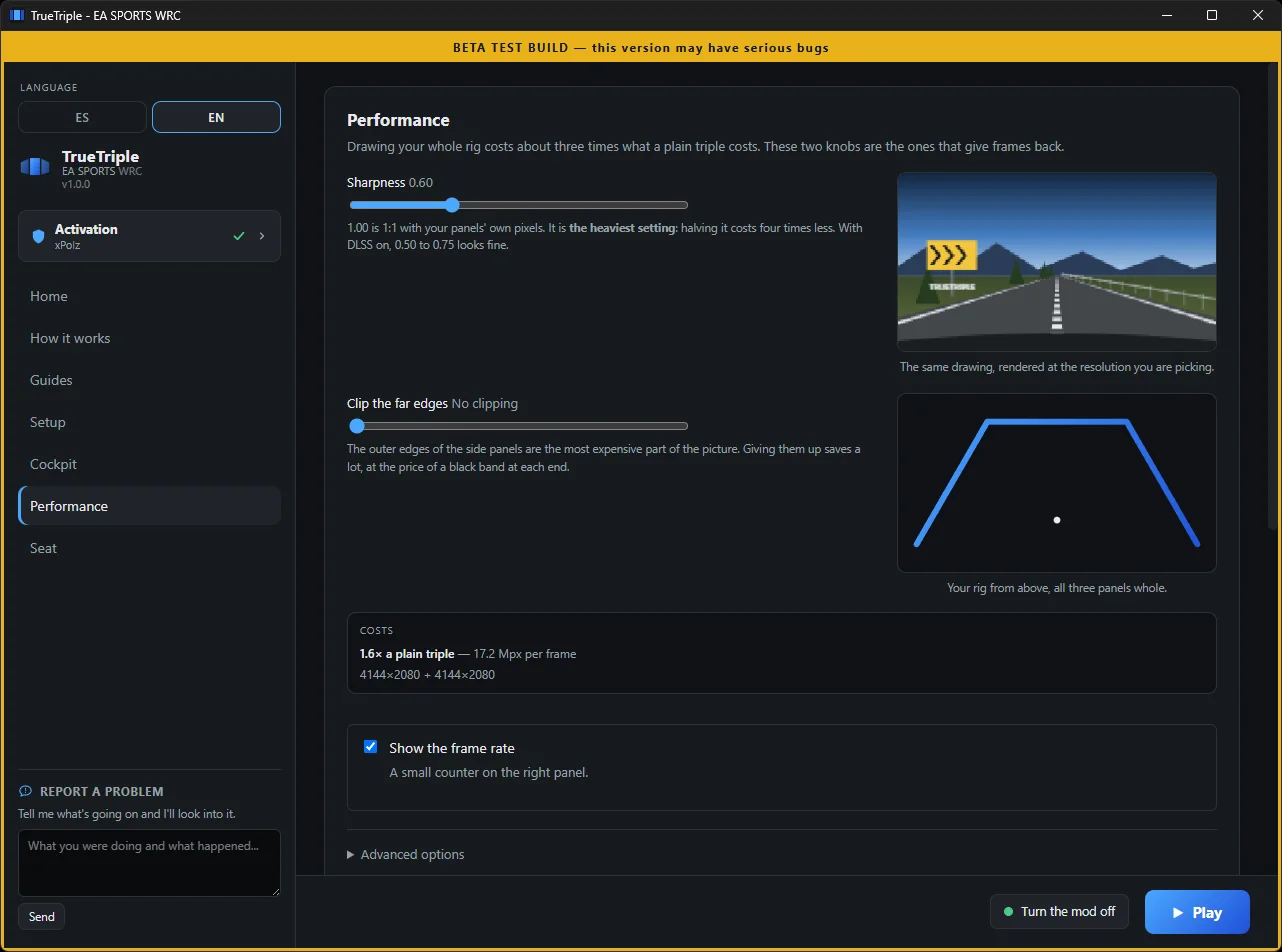
The game treats your three screens as one giant monitor and stretches the sides. TrueTriple gives them three real perspectives, computed from your own rig. And it does it without putting a single line inside the game: it installs as a SteamVR driver, so the anti-cheat has nothing to look at.
WRC runs EAAC, EA's own anti-cheat. It is kernel level and it blocks even ReShade, so putting code inside the game was never a good or bad option: it simply is not an option. The way in was somewhere else, and it is the strangest part of this mod. Instead of touching the game, we make it believe you are wearing a VR headset.
You do not need a headset, and you never needed to own one. The one being installed is virtual: a driver living inside vrserver.exe, the Valve process the game already expects to find when it opens in VR. WRC enters its usual VR mode, draws two views believing someone has the goggles on, and those two views end up on your three monitors. Not one line of ours runs inside the game.
And no, this is not playing in VR. There is no headset, no head tracking, and the view does not move on its own: it stays fixed on the seat you asked for, exactly like on any triple-screen setup. Only one thing is taken from VR mode, and it is the only door through which the game hands two views to another process without anyone having to get inside it.
This is not a benchmark number. It is the first time the game shows you the world at real scale.
The sides stop lying to you. The pillar, the mirror, the edge of the bonnet all sit where they belong. For the first time it feels like driving from inside, not like looking at a wide photo of the car.
Projecting with your rig's real geometry means everything is the size it would be in real life. Corners read better because the braking point is where your eye thinks it is.
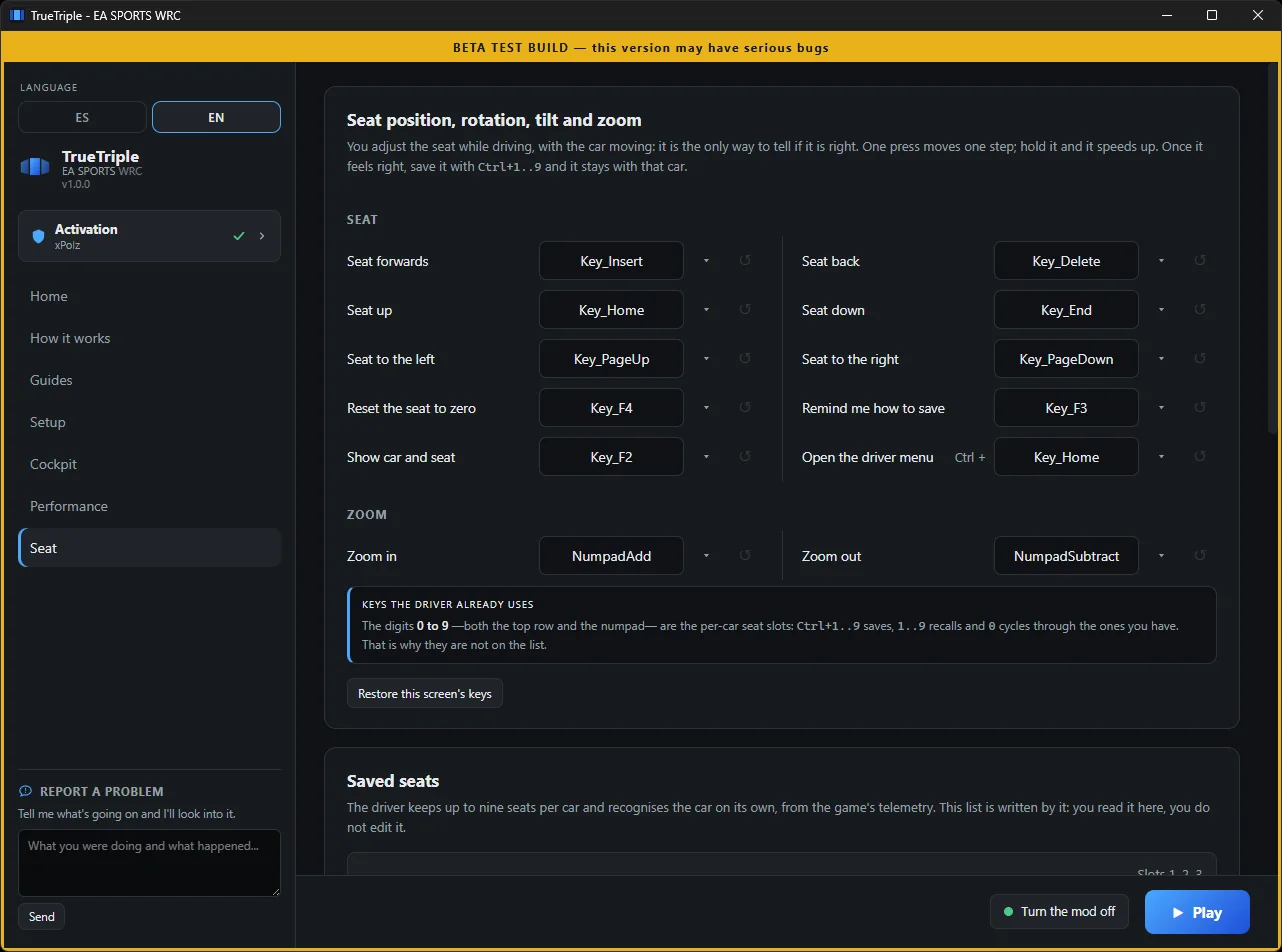
Set your view while driving: move it forward, back, up, turn it, tilt it, and save it. Up to nine positions per car, and the mod recognises which car you are in on its own: switch cars and it finds your seat.
What gets installed, and what you get inside the game.
The three perspectives come from your rig's measurements: distance to the middle panel, real panel size, side angle and bezel. This is not a slider you nudge until it looks about right.
No DLLs, no hooks, no injection, no shader patches. Not one line of ours runs inside WRC, and that is the one rule this project does not negotiate.
Ctrl + 1 to 9 saves, 1 to 9 loads and 0 cycles through the ones in use. It stores position, rotation, tilt and zoom, and works on both the top row and the numpad.
Which car you are driving comes from WRC's official UDP telemetry, a channel EA documents and exposes on purpose. Nothing's memory is read: switch cars and it finds your seat.
An on-screen menu to change what you need right there, and an fps counter on the right panel so you can see what each change costs you.
You enter the diagonal in inches, the resolution, the distance to your eyes, the side angle and the bezel. It writes the configuration, installs the driver, sets SteamVR as your OpenXR runtime and configures telemetry.
You set it up once and after that it is open it and press Play.
There are two tiers on Patreon: 3 dollars a month for the finished apps, and 5 if you also want the ones in beta or in development. EA SPORTS WRC is in beta, so it sits on the 5.
Either way, what you download is yours forever. Your key is created the moment you subscribe, and that key does not expire: if you cancel one day, whatever you already activated keeps working. No licence runs out and no server can switch it off, and that is not a promise: the key is signed and gets validated on your own PC, without asking anyone anything.
So if you subscribe for one month, download it and leave, that is perfectly fine and fair by me. What you pay month to month is not this: it is what comes next.
Starting with the one everybody asks.
No, and you never needed to own one either. The headset this mod uses is virtual: a driver installed into SteamVR that makes the game believe one is plugged in. The only thing you have to install is SteamVR, which is free and on Steam.
There is a drawing of it right above.
No. There is no headset, no head tracking, and the image does not move when you move your head: the view stays fixed on the seat you asked for, exactly like on any triple-screen setup. Only one thing is taken from VR mode, and it is the only door through which the game hands two views to another process.
I will answer this at length, because the question deserves an honest answer and not a "don't worry about it". WRC runs EAAC, EA's own anti-cheat: kernel level, mandatory, and it blocks even ReShade. So the question is fair and I am not going to dodge it.
That is precisely why this mod is built the way it is. The project has one rule:
no code of ours inside the game's process. No DLLs, no hooks, no
injection, no shader patching. What gets installed lives inside vrserver.exe,
which is a Valve process, and the game enters its own VR mode, a feature EA
shipped with WRC. From the game's side nothing odd is happening: it opened in VR, the way
anyone can.
I tested it end to end twice and there was no reaction at all, and it makes sense that there would not be, because the mod does not show you more track: it shows you the same track undistorted, which is exactly what was ruining the sides.
With all that said, I cannot give you a guarantee, and be wary of anyone who does: no anti-cheat publishes what it looks at or promises not to change it. What I can tell you is that nothing is installed in the game's folder: if you want to go back, you uninstall the SteamVR driver and not one file of ours is left anywhere near WRC.
It costs something, because the game now draws two views instead of one, and that is the price of having three real perspectives. The main lever to control it is the mod's supersample, available both in the app and in the in-game menu: lowering it buys performance back without touching the geometry, which is the part you do not want to move.
With DLSS enabled in the game, the combination working best on my rig sits between 0.5 and 0.75 supersample. I am not giving you an fps percentage because it depends far too much on each machine and on your panel resolution: try those values and keep the one that works for you.
Because the game sends a single image per frame with the HUD already baked into it, and there are no two layers to separate. This is measured, not a hunch. Any rotation the mod applies drags the HUD along with it, and from outside the game there is no way to peel it off.
It is a known limitation, it lives on the sides and you play just fine anyway. If EA ever separates that layer, it fixes itself.
In the app, on the Rig screen: diagonal in inches, one panel's resolution, the distance from your eyes to the middle monitor, the side angle and the bezel. The three perspectives come out of that. You do not have to measure width and height in centimetres: they are worked out from the diagonal and the resolution.
And if you use NVIDIA Surround with bezel correction on, the bezel is worked out too: the mod compares the width Windows reports against your three panels and derives the centimetres each seam hides.
Yes, for now. The mod draws the three panels into a single window, and that window sits on one Windows display: Windows has to see your three screens as a single one. NVIDIA Surround does that, so does AMD Eyefinity, and so does any tool that merges them into one virtual monitor. With three separate screens the window lands on just one of them, squashed.
This is a temporary limit: making it work across three separate screens is something I am going to try. Meanwhile, if you use Surround with bezel correction on, the bezel is worked out for you too; with Eyefinity or a virtual monitor you type it into the app.
No. What gets installed is a SteamVR driver, which lives in the Steam folder, plus a telemetry file in your Documents and a few settings in the game's own configuration. Nothing is copied into the WRC folder.
For me yes, and I own both. VR is stunning for the first few minutes, but it tires you out and gets in the way. With the perspective properly computed, triples hold up over long sessions without leaving you with a headache. It is a preference, but it is mine after trying both.
DiRT Rally 2.0 and DiRT Rally (2015) are both finished, each with its own app. Every game is a different engine and takes the whole job: it is not copy and paste, and this is the clearest example, because here the same method could not even be used. They are all here.
If the game will not go into triple mode, or it does and something is not responding, start here. If you hit something that is not on the list, tell me and I will add it.
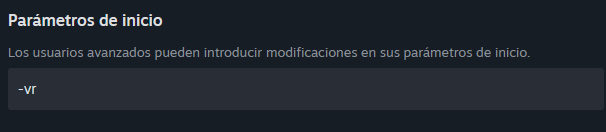
-vr and close. The app does this for you if you launch the game from its Play button.The driver reads its configuration when SteamVR starts, and never looks at it again. There is no hot reload. If you saved with SteamVR already running, what you are seeing is the previous configuration.
Close SteamVR, open it again and go back in. The app tells you when this is needed.
This is the most annoying one and worth knowing in advance: WRC rewrites its own configuration file every time you enter the graphics menu. The settings the app left in that file are lost right there, and the game says nothing about it.
Apply the configuration from the app again, and stay out of that menu. If you need to change graphics settings, do that first and apply the mod's configuration afterwards.
The mod finds out which car you are driving through the game's UDP telemetry, which has to be enabled. If it does not arrive, the profiles still work by hand (you save and load them with the keys) but they will not switch by themselves.
Documents\My Games\WRC\telemetry\udp.config.json. If you use SimHub or another tool, its entries stay too: it is a list, not a spot for one.The app sets all three up for you. If you edited that file by hand, check the whole list was not replaced.
Almost always the rig measurements are not the real ones. The three that show the most when they are wrong:
With those three right, the scale falls into place on its own: this mod needs no eyeballed tweaking.
Lower the supersample, which is the heaviest lever, and enable DLSS in the game. Between 0.5 and 0.75 supersample with DLSS is the range working best so far.
Do not lower the zoom or touch the cant to buy fps: both break the 1:1 scale, which is the only thing this mod is here to fix.
That is an effect of the game itself, and it does not live in any file the mod can write: it is in your profile, inside WRC's own options.
Turn it off by hand in the game options. It is one of the very few things left to do manually.
I made TrueTriple for myself, to play the way I wanted to play on my own rig. I shared it afterwards because it turned out to be useful to other people. It is not a company product: there is no team behind it, no QA department, no support desk. There is one person.
It can have bugs, and it can break when the game updates. When you subscribe you are not buying a product: you are backing the development, and in return I give you access to what I am building. The Patreon is also where it gets told from the inside: the dead ends, what breaks and why, and where this goes next.
The same Patreon puts out Assetto Gallery, which sorts out the car and track library for the people running Assetto Corsa. Take a look.
No fine print: terms of use and support.